
How wcode Grew Past the MCP Bridge I Started With
On this page7 sections

I did not start wcode because I wanted to build another coding agent.
The first idea was simple: use the models already available in web products for coding, while giving them a way to work with the real repository on my machine. The model was in the browser; the code was local. Anything beyond a tiny question meant copying files, uploading an archive, explaining the directory structure, and doing it again as soon as the repository changed.
The first version of wcode was therefore a bridge. It let a browser-based model search local files, read code, make changes, and run checks through tools. MCP later gave that connection a more standard shape, but getting the connection to work was not the part that kept me working on the project.
Once the bridge worked, another problem became much harder to ignore: how was the agent actually reading the codebase?
A lot of code-CLI discovery starts with grep, ripgrep, file listings, and shell-style repository scans. There is nothing wrong with that. I use those tools all the time, and for finding a string, filename, or obvious symbol they are often exactly the right choice.
The problem is what happens next.
A search returns matching text. The model still has to reconstruct which definition matters, whether two same-named symbols are related, who calls what, what a change might affect, which test covers the behavior, and whether a relationship is merely plausible from text or actually resolved by a language-aware tool.
Stronger models can reconstruct more of that from snippets, but the repository-understanding work is still being pushed back into the context window. As the codebase grows, repeated names, cross-module calls, generated code, and incomplete slices make that reconstruction increasingly fragile.
That is where wcode changed direction. I stopped only adding commands and started treating repository reading as its own engineering problem.
Then I started working on how the agent reads the repository#
wcode still uses text search. Cheap localization should stay cheap. If the question is “where is FooConfig?”, starting a semantic pipeline just to look sophisticated would be wasteful.
But once the question becomes “who calls this?”, “what implements it?”, “what does this rename affect?”, or “which test proves this behavior?”, matching text is no longer enough. wcode can use Tree-sitter for stable syntax structure, upgrade to a warm LSP session when cross-file semantic relationships matter, and combine that with the current Git state, Design State, tests, and known graph relationships.
What reaches the model is therefore not only a pile of source snippets. It can be a bounded task context containing relevant symbols and exact ranges, references or calls, associated tests, current changes, project constraints, and the provenance, precision, and revision of those facts.
A rough way to think about the two paths is:
- Common text-discovery loop: task →
grep/ripgrep/ file slices → matching text → model reconstructs the code relationships. - wcode repository-reading path: task → cheap localization → syntax/semantic relationships when needed → task-ready evidence → model reasons over context with explicit provenance and precision.
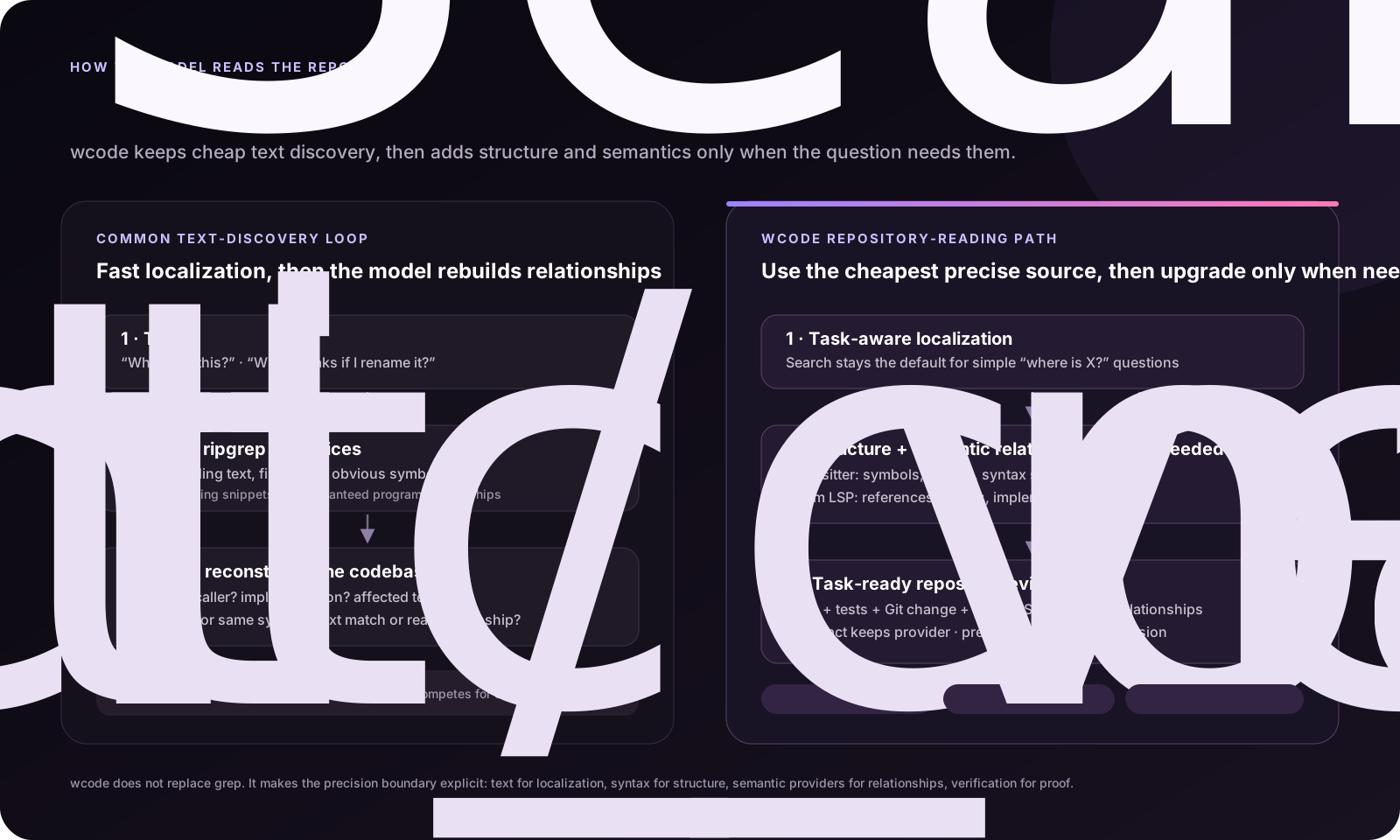
Take a routine change such as adding a status filter to a list endpoint. Searching the endpoint name may find the handler, but that does not guarantee the parameter definition, query construction, callers, and regression tests are all in view. agent_context gathers the implementation, tests, project guidance, and verification entry points that look relevant to the current task. If the task explicitly needs callers, references, implementations, or impact, readiness can then direct the agent to semantic navigation.
That distinction matters to me: not every question should pay for the heaviest analysis, but the agent should know when search has stopped being enough. wcode reports only the precision it actually has. Tree-sitter syntax is not presented as compiler semantics, and an unavailable LSP does not become a fake claim that every caller was found.
Making an edit without losing someone else’s work#
Back to the filter example. The agent reads a file and starts preparing a change. Meanwhile, I might edit the same file.
Writing the agent’s older version back could lose my work. To prevent that, wcode returns a SHA when it reads a file—a fingerprint of the contents. An edit must carry that fingerprint. If the contents have changed, the old edit is rejected and the agent has to read again.
Operations also need an appropriate scope and order. Reading several unrelated files can happen in parallel. Two changes to the same file need coordination. After editing, review_changes examines the diff and verify_project runs the project’s checks.
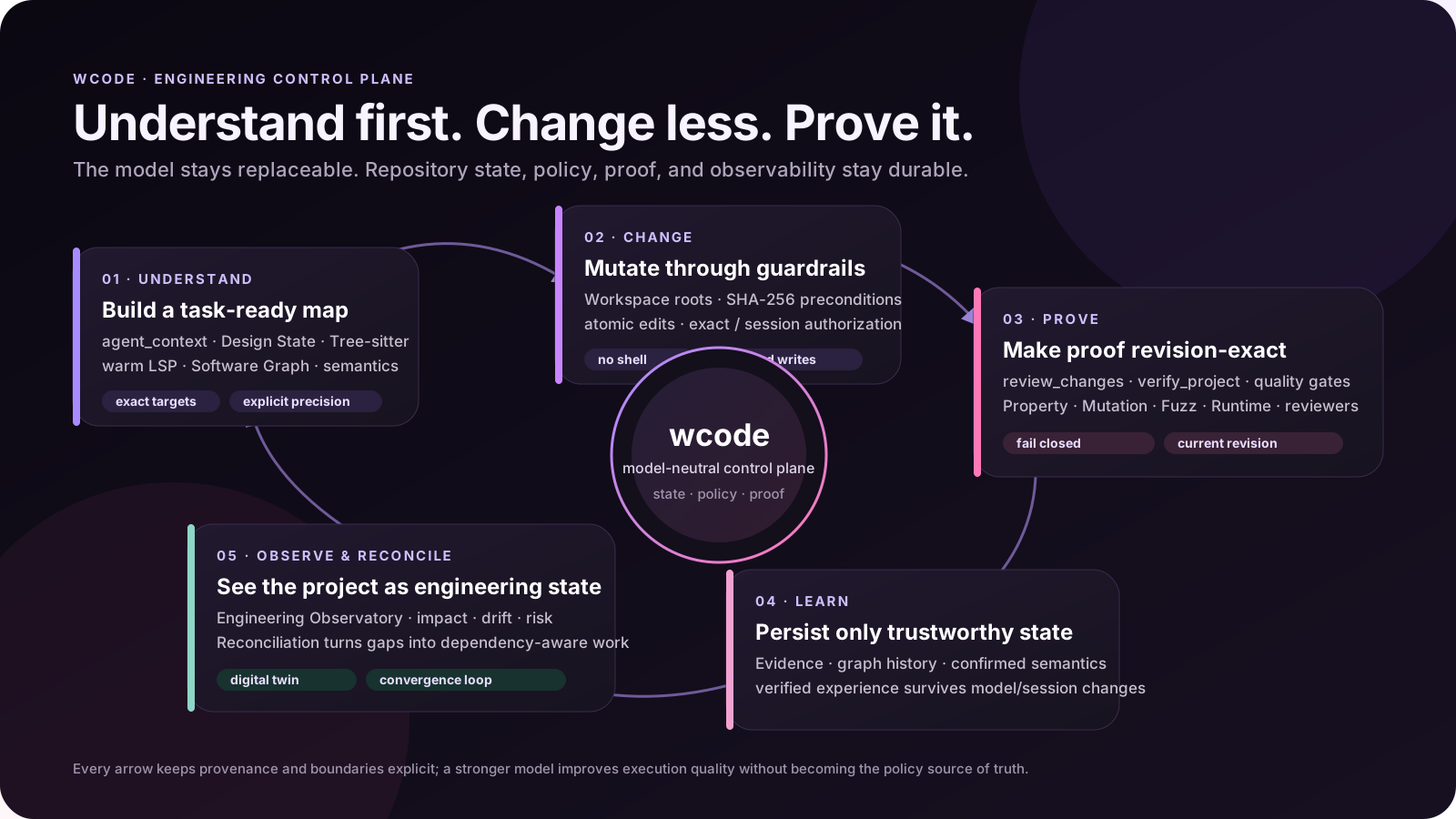
The documentation calls this an engineering control plane. In everyday use, it means keeping the files, operations, and check results connected. The next task can inspect what happened, even if I switch models or clients.
A passing test belongs to a particular change#
The filter is implemented and its tests pass. Then the parameter parsing changes, but the tests are not run again. The earlier pass describes the earlier code.
wcode associates check results with the code and design revisions they ran against. Its interface distinguishes finding a corresponding test from executing it, getting a pass, and having a result that still applies to the current version.
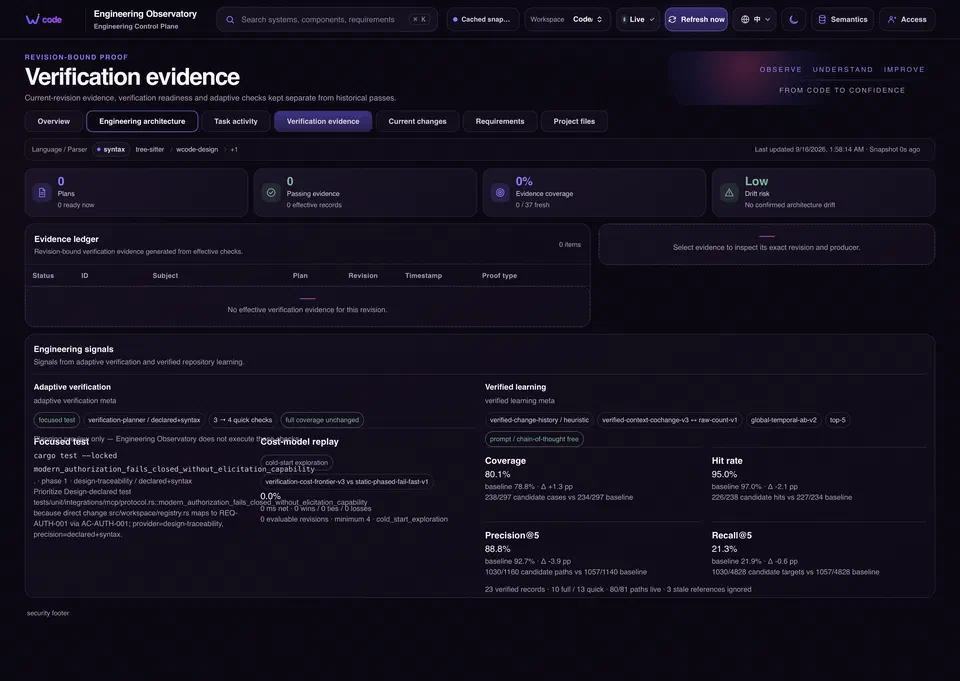
The checks also need to answer the right question. This blog is built with Hugo. After editing Markdown, I need an actual build to establish that both language pages were generated, their images exist, and the public URLs stayed intact. Reading the text cannot establish those things.
A code project needs its corresponding build, tests, or other project checks. Higher-risk work can use more extensive verification when configured. The diagram shows available lanes; it does not mean every change must run all of them.
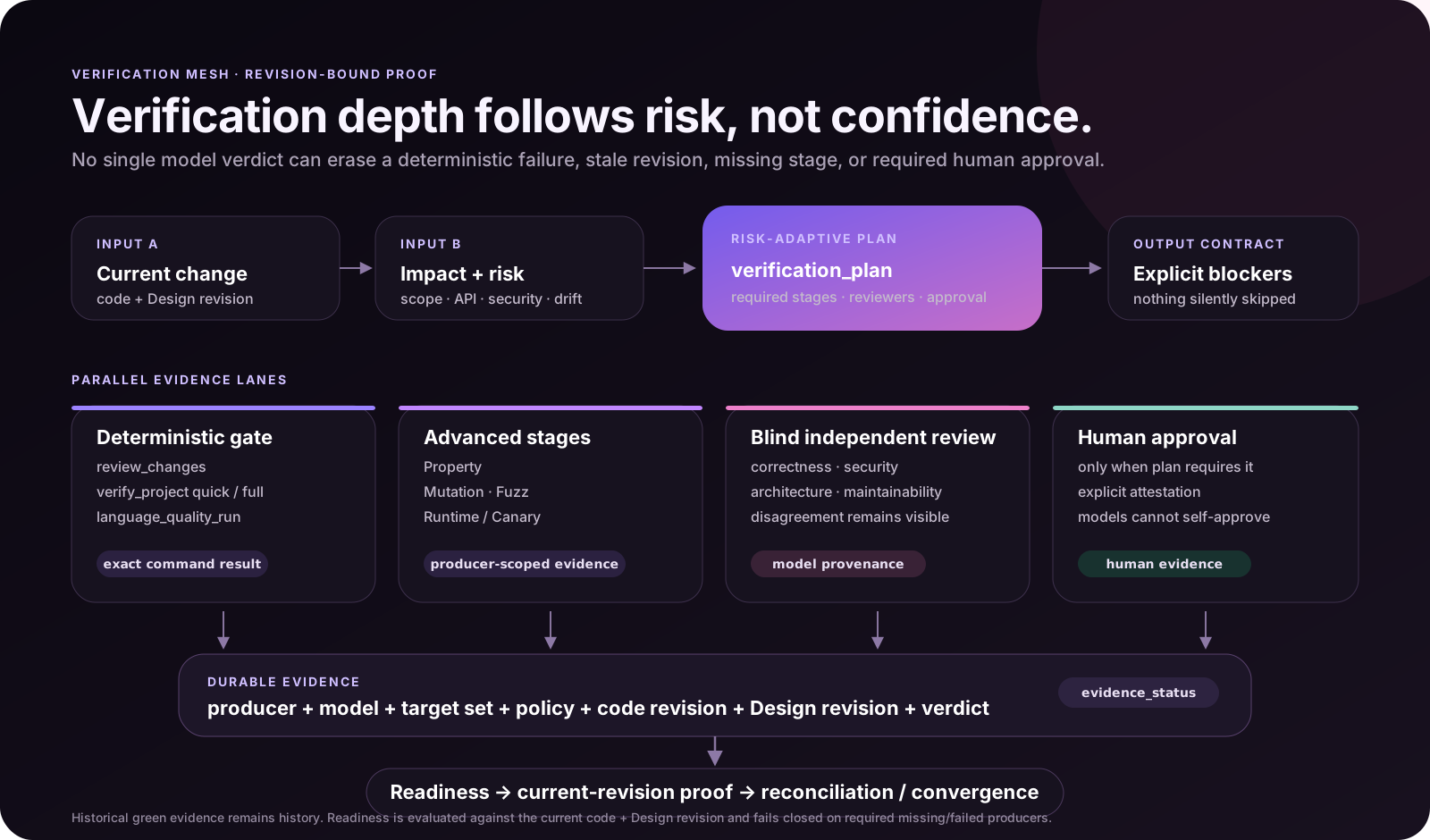
Successful work from an earlier task can help locate relevant files next time. Its test results cannot be reused indefinitely. That is one of the details I want wcode to keep track of.
Giving project rules somewhere to live#
Some requirements are invisible when looking at one function or file.
On this blog, Chinese pages stay at the root and English pages live under /en/. The photography Gallery has its own page and scripts. Editing an article should preserve its public address. An assistant unaware of those rules could finish the immediate task while changing something else I wanted to keep.
wcode can record these requirements under .wcode/ in the repository. The documentation calls this Design State: requirements, components, constraints, and acceptance criteria. Later tasks can retrieve them while inspecting the project or assessing a change.
The Engineering Observatory opens on its architecture view. It shows which source belongs to a component, related requirements, and dependencies found by the analysis tools.
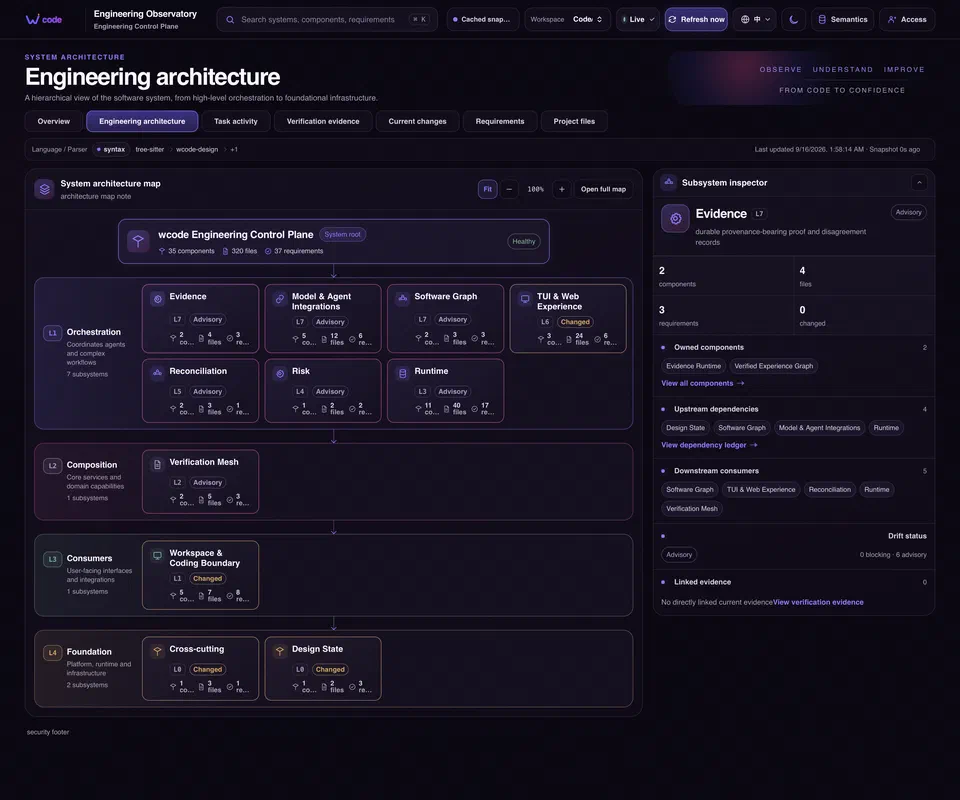
These records need maintenance as the project changes. A diagram does not establish that an architecture is correct. It gives me a place to compare information that would otherwise be scattered across files and conversations.
Deciding what the assistant can access#
wcode works within a selected Workspace: the project scope available for this task. File operations check paths, protected locations, and unsafe links. Edits to existing files also check the content fingerprint.
Commands have their own rules. Common development commands with bounded behavior can run directly. Operations requiring additional trust go through local authorization, where the operator can inspect and allow the request. Broader session grants and Full Access also require an explicit operator choice.
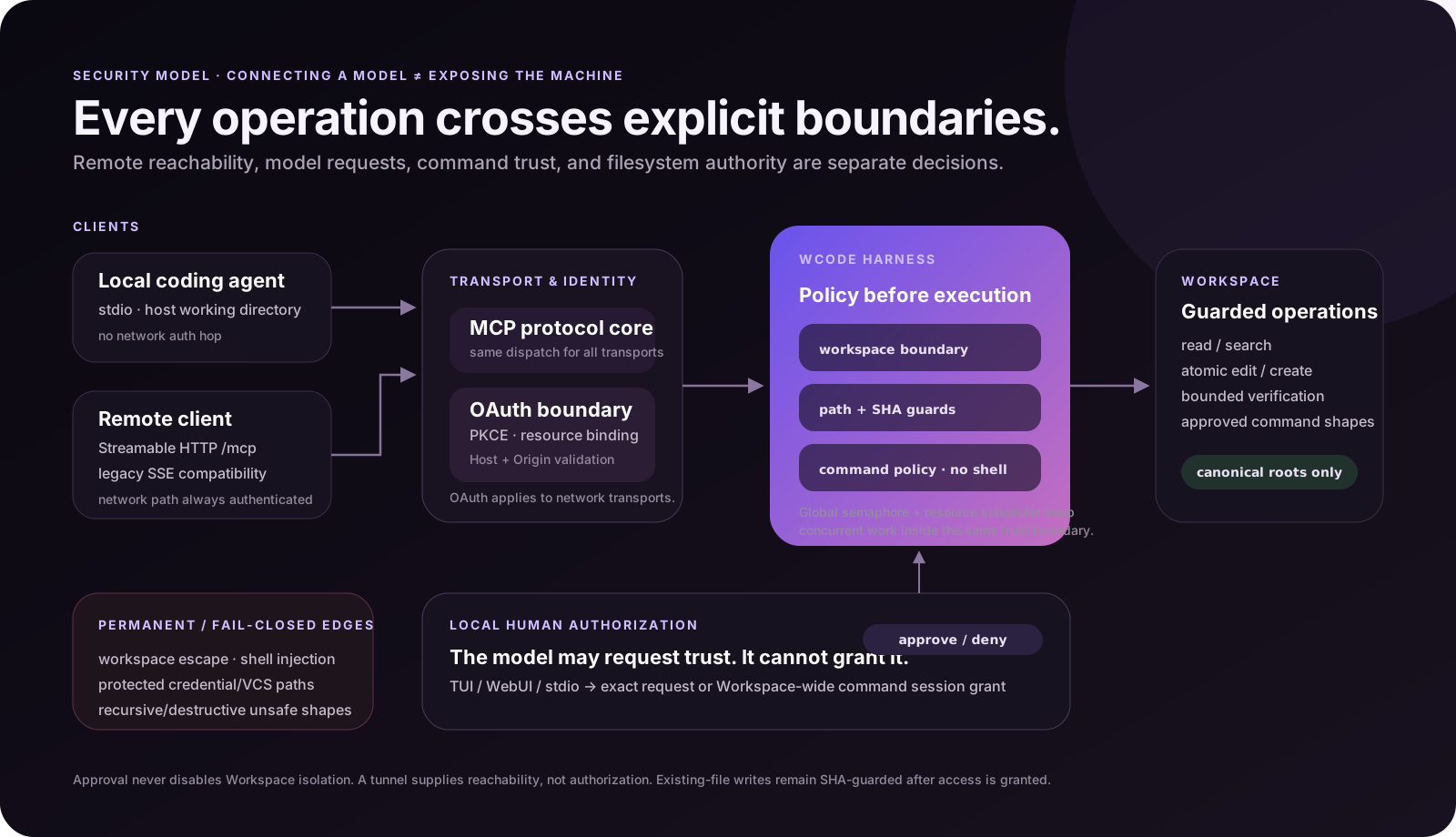
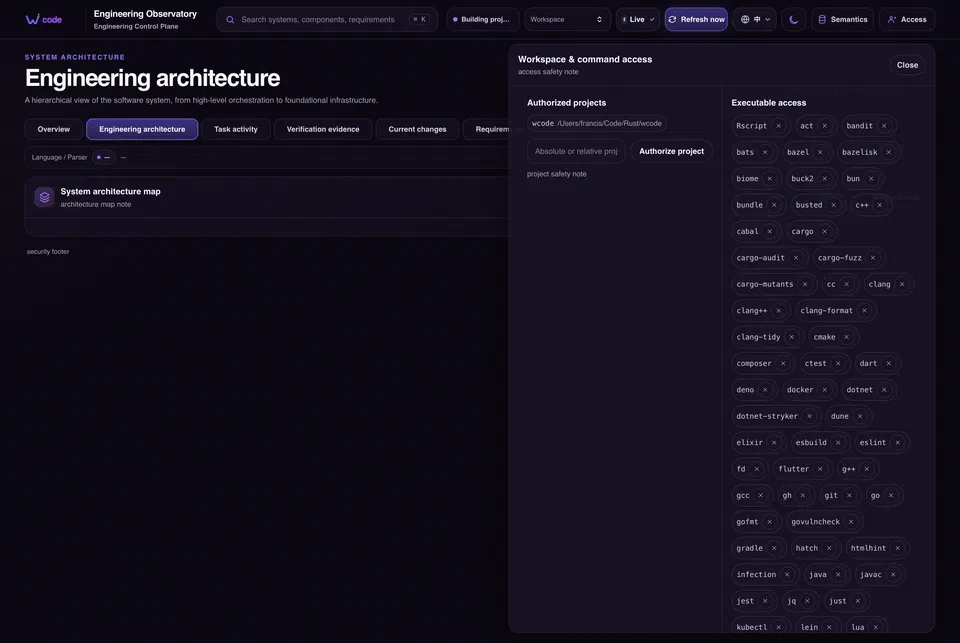
A local client can start wcode over stdio. A remote client uses OAuth to connect to a running service. Both reach the same repository tools. File operations happen on the repository’s machine; with a cloud model, code that is read still reaches the corresponding client as a tool result.
These are controls at the repository and tool layer. They are not equivalent to an operating-system sandbox.
What the interface is useful for#
I mainly use the interface to see where the work has got to.
The terminal dashboard shows connections, the selected project, tasks, and authorization requests. W opens the Engineering Observatory; O opens Setup Hub. The Observatory contains architecture, current changes, requirements, project files, and verification records.
When a task slows down, Task activity is useful. It separates time spent waiting in a queue from time spent executing, and shows child processes and resource use. Waiting for capacity and running an expensive command are different problems.
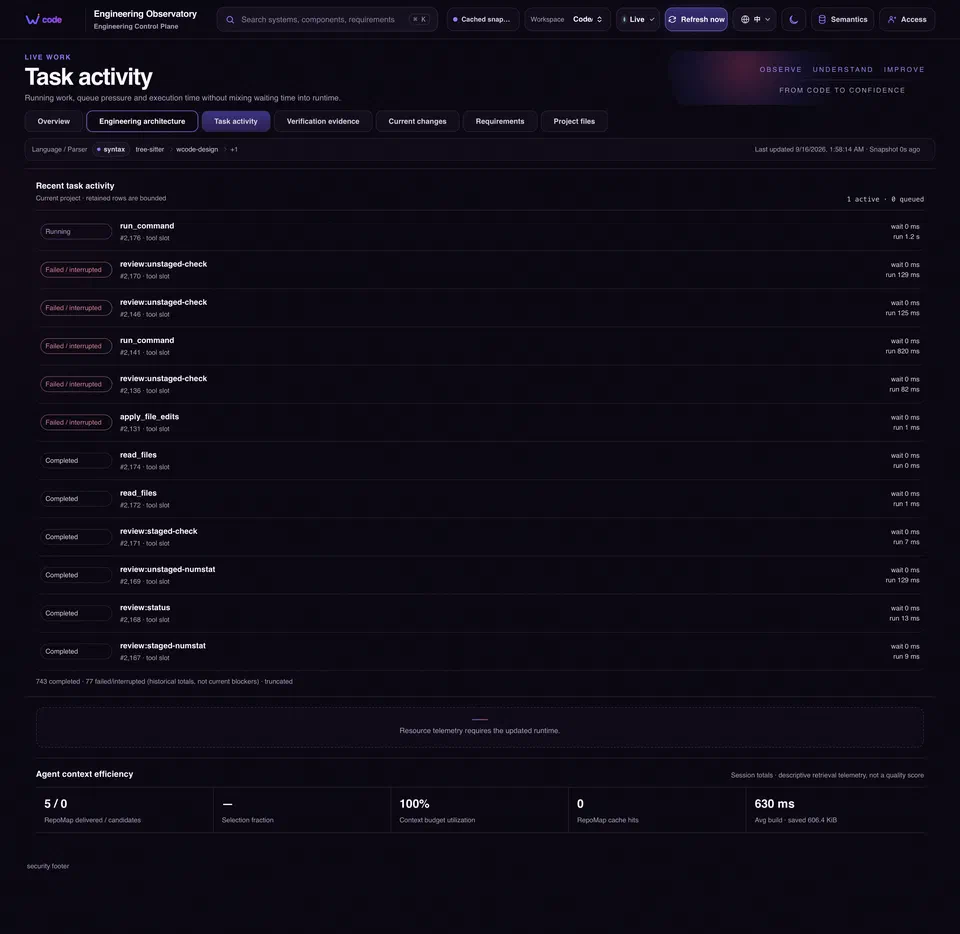
wcode limits concurrency separately for CPU work, file I/O, and child processes. Independent work can overlap while leaving the machine some room. The useful balance still needs to be checked against real tasks; a concurrency number alone says very little.
Trying it on a familiar project#
If you already have an AI coding assistant you like, start with a project you know. A small change makes it easier to judge whether the assistant found the right code and whether the result makes sense.
On macOS or Linux, install a release with:
curl -fsSL https://raw.githubusercontent.com/francis-du/wcode/main/install.sh | sh
Windows installation is covered in Getting Started. Then run this from the project directory:
wcode setup
Choose global or project configuration and reconnect the agent. For local stdio use, the client starts the process. Run wcode when you want the terminal dashboard, web interface, or remote access. Remote clients use the current MCP address displayed by the program and complete OAuth; the integration guide has the steps.
There is no need to configure every feature for the first task. Start with the smallest useful loop:
- Have the agent locate one implementation.
- Change one behavior.
- Run the relevant checks.
- Read the diff yourself.
Then add the project rules you find yourself repeating under .wcode/.
The source is on GitHub, with installation and integration details in the project documentation. Your chosen service still provides the model. wcode handles the connection to the repository and the work on that side.