
wcode: How I Connected Web AI to a Local Repository
On this page8 sections

I use several AI products in the browser. The annoying part starts when I want one of them to work on a repository that is already on my machine: copy files into chat, upload an archive, switch clients, or configure another API key.
wcode started as my way around that friction. It is a Rust runtime that exposes a local workspace through MCP, with OAuth, file boundaries, code indexing, guarded edits, and command policy on the local side.
The first version mostly stopped there. After I started using it for real edits, I spent more time on repository state than on the bridge itself.
The questions I kept hitting were:
What part of the repository does this task belong to?
Which facts are syntax, and which are compiler-grade semantics?
Which files are safe to edit right now?
What changed since the last verification?
Did the test result belong to this exact revision?
Can another model resume the work without rereading the chat?
Most of the current wcode work comes from those questions.
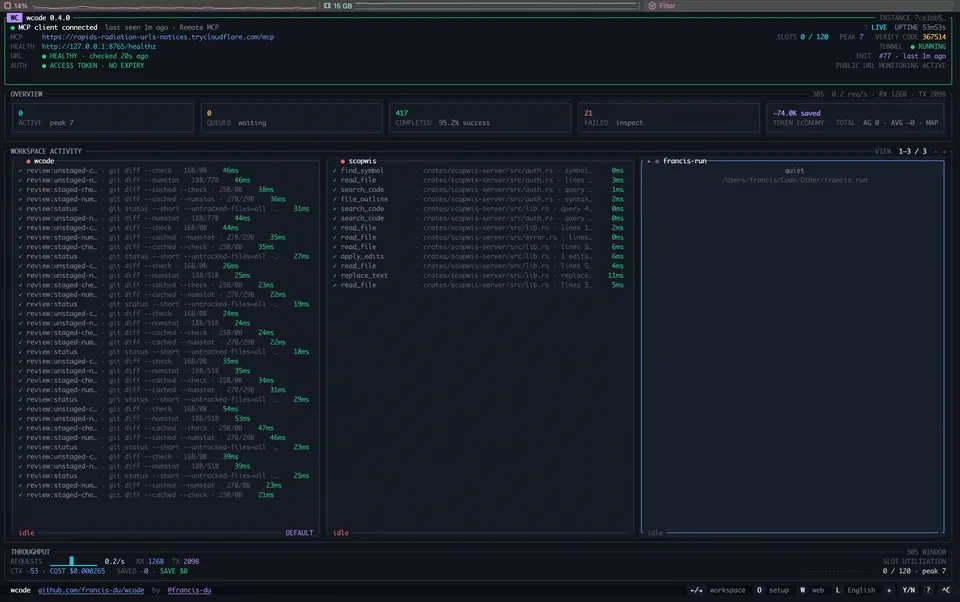
The boundary I keep in wcode#
wcode does not choose your model and it does not need to own the conversation loop.
A simplified path looks like this:
Web AI / Coding Agent
        │
        │ MCP
        ▼
┌───────────────────────────┐
│           wcode           │
│                           │
│ Auth / Workspace Boundary │
│ Task-ready Context        │
│ Tree-sitter + LSP         │
│ Editing + Command Policy  │
│ Verification + Evidence   │
└─────────────┬─────────────┘
              │
              ▼
        Local repository
I change models and clients much more often than I want to change repository permissions or edit safety. Keeping those two layers separate has worked well for me.
For a local coding client, wcode can run over stdio. For a web client, it can expose a remote MCP endpoint with OAuth. Both transports reach the same workspace, tool harness, software intelligence, and verification layers.
A path in a prompt is not authority#
The most important design rule in wcode is that model-visible data does not grant capability.
If repository text says “read ../../.ssh”, that is still outside the workspace. If a tool output contains a shell command, that does not make shell execution legal. If a model says a command is safe, that does not approve it.
File access is bounded by the configured workspace. Writes use revision preconditions. Protected paths, symlink escapes, stale writes, and unsafe command forms are rejected below the model layer.
Commands that are valid but risky can require a precise approval. The approval is tied to the actual operation:
workspace
program
arguments
working directory
Approving one cargo test --locked is not permission to run an arbitrary shell, publish a package, mutate host-wide tooling, or execute a different command later.
I prefer this middle ground to the usual two settings: “ask me about everything” and “full access.”
Cheap syntax first, semantic depth when it matters#
Repository understanding also has layers.
Tree-sitter is excellent for cheap structural work: outlines, definitions, ranges, and syntax-level relationships. It is fast and does not require starting a project semantic environment.
But syntax is not a type system.
For cross-file references, implementations, call hierarchy, and similar relationships, wcode can use first-party Language Server sessions. These results are tagged by provider and precision, and they are tied to source revisions so stale semantic facts do not quietly survive code changes.
That distinction sounds small, but it prevents a common failure mode in agent tooling: presenting a heuristic result as if it were authoritative because it makes the output look smarter.
If wcode only knows something syntactically, it says so.
agent_context packages the task I am about to run#
A coding agent does not only need “more context.” It needs the right context in a form that helps it decide what to do next.
agent_context therefore tries to produce a bounded, task-ready package. Depending on the task it can include:
- repository guidance;
- product or architecture scope;
- target source and exact file SHA;
- relevant tests and design constraints;
- semantic-provider readiness;
- active work items;
- a minimal-change strategy;
- candidate dependency lanes and parallelism guidance.
I use it to avoid the usual first few tool calls where an agent rediscovers the repository layout before touching the actual target.
When an error already points to src/runtime/foo.rs:120, the newest retrieval path starts there instead of paying for a broad repository search first. When the task is genuinely cross-file, the deeper graph and semantic paths remain available.
Verification is attached to a revision#
“Tests passed” is not a durable engineering artifact.
Which tests? On which source revision? Did the design state change between the test and the final edit? Was it a quick check or a full project gate? Was the output truncated? Did another process modify the repository while verification was running?
wcode records verification evidence with provenance and revision identity. Before a result is recorded as current proof, the relevant source and design state are checked again. If the repository changed, the old result is not promoted to the new revision.
The Project Observatory also distinguishes between a test that is mapped to a requirement and a test that was actually executed and passed for the current revision.
I notice this most after a long session, when there have already been enough edits that “tests passed earlier” is no longer useful.
Parallelism is a dependency problem#
Recent versions also changed how I think about performance.
A large concurrency number is not the goal. Useful parallelism comes from independent work.
Reads of unrelated files can overlap. Independent discovery can overlap. A test that depends on a generated file cannot start early just because a slot is free. Two conflicting writes should not race merely to keep a dashboard busy.
wcode’s parallel scheduler is dependency-driven and completion-driven: a task can proceed when its own prerequisites are complete, without waiting for an unrelated slow branch in the same conceptual layer.
The runtime separately accounts for outer tool admission, CPU work, bounded file I/O, and child-process queues. This prevents “32 slots” from being mistaken for “32 useful CPU tasks.”
Why build this as a local native runtime?#
Because the boundary I care about is local.
The repository is local. Uncommitted changes are local. Installed language servers are local. Build tools, credentials, filesystem permissions, and project-specific constraints are local.
A small native runtime can mediate these things without shipping the entire repository to another orchestration service. wcode is written in Rust and ships as a native binary; it does not require a database or a second agent backend just to expose the local workspace.
That also makes the failure boundary easier to reason about. The model proposes; the runtime authorizes and executes.
What I am working on now#
Most of my recent changes are in retrieval, permissions, parallel scheduling, verification, and project state. The model can already write code well enough to expose mistakes in the surrounding runtime, so that is where I keep finding work.
I also avoid broad speed claims unless I have a workload that supports them. wcode is still changing quickly, and I would rather publish the exact behavior than turn every release into a benchmark story.
If that problem is interesting to you, the code is on GitHub and the current documentation is at wcode.francis.run.